Archive
Archives enable you to maintain a long-term history with change tracking of your incoming data within Bragi.
They are designed to retain data indefinitely and support any data type, whether transactional or otherwise.
Archive Helpers
When using Archives, Bragi generates helpful supporting components in your data warehouse to simplify querying and analysis of historical data:
getChanges_<ArchiveName>Stored Procedure (Tracker only):
Retrieves changes between two points in time for the archive.getPointInTime_<ArchiveName>Stored Procedure (Tracker only):
Returns the full contents of the archive as of a specific point in time.update_<ArchiveName>Stored Procedure:
Contains the core logic to update the archive. Typically, this is invoked automatically in Bragi’s orchestration pipeline, but can be reviewed or executed manually for troubleshooting.<ArchiveName>LatestView (Tracker only):
Displays the most recent version of each record.
Archive Indexes
Bragi also creates indexes on the archive table to keep both the archive run and queries against the archive fast:
<ArchiveName>_IDX:
Unique index enforcing the business key.<ArchiveName>_SC(Tracker only):
Speeds up the change detection performed by the archive run.<ArchiveName>_CUR(Tracker only):
Filtered index over the current rows (arc_current_flag = 'Y') covering all source columns. This serves the<ArchiveName>Latestview, so reading the latest data stays fast no matter how much history the archive has accumulated.
These indexes are dropped and recreated whenever the archive is saved or repaired, so they always match the current column configuration.
Archive Options
Field | Description |
|---|---|
Schema | Warehouse schema where the archive is stored. You can create one using the plus arrow. |
Name | Name of the archive; this will be the identifier used in the warehouse. |
Refer to best practices for naming configs for guidance on consistent and clear naming conventions.
Types of Archives
There are two main types:
Tracker Archive
A Tracker Archive maintains a full change history of each record. Upon detecting any change against a business key, it inserts a new version of the record.
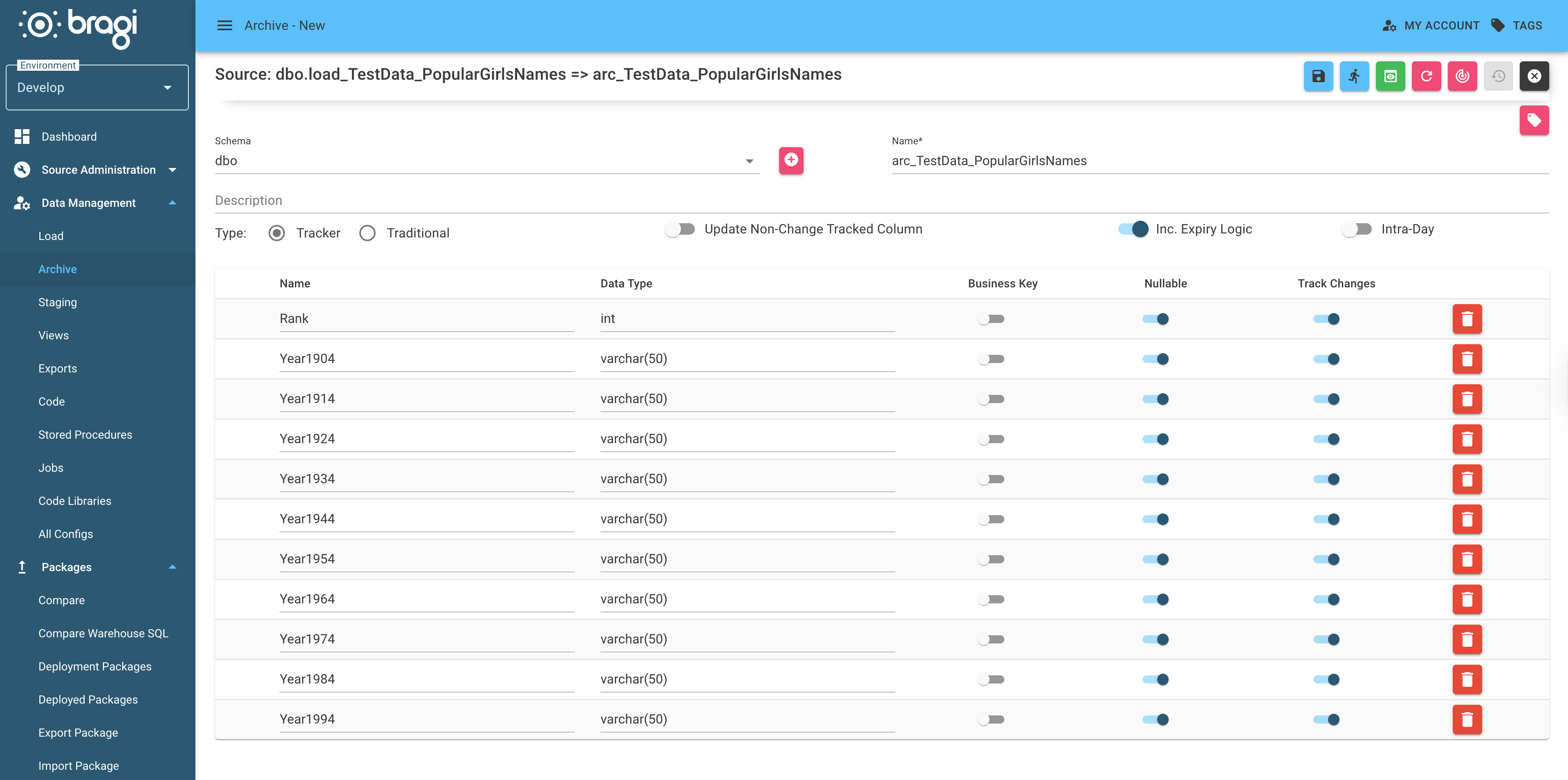
Tracker Archives offer these options:
Field | Description |
|---|---|
Update Non-Changed Tracked Columns | If enabled, non-'Track Changes' columns are kept current without creating a new record. |
Inc. Expiry Logic | When enabled, detects records missing from the source and sets their |
Intra-Day | Allows multiple runs per day. Beware: enabling this can cause very large archive tables. |
Tracker Archives also add the following columns beyond your source data:
Column | Description |
|---|---|
arc_arrival_date | The date the record arrived in the archive. |
arc_departed_date | When the record version was superseded or left the dataset (if applicable). |
arc_start_date | When this record version became valid. |
arc_end_date | When this record version ended (superseded by a newer version). |
arc_current_flag | 'Y' if this is the latest version of the record, otherwise 'N'. |
arc_version | Incrementing version number starting at 1 for the first record version. |
arc_update_time | Timestamp of when this version was last updated. |
Tracker Archive Example
Source dataset (Id is the business key):
Id | Name | Address |
|---|---|---|
1 | Marc | Marcs House |
2 | Matt | Matts House |
Initial archive output:
Id | Name | Address | arc_arrival_date | arc_departed_date | arc_start_date | arc_end_date | arc_current_flag | arc_version | arc_update_time |
|---|---|---|---|---|---|---|---|---|---|
1 | Marc | Marcs House | 2024-01-01 | 2024-01-01 | 2999-12-31 | Y | 1 | 2024-01-01 09:00:00 | |
2 | Matt | Matts House | 2024-01-01 | 2024-01-01 | 2999-12-31 | Y | 1 | 2024-01-01 09:00:00 |
If Marc’s address is updated:
Id | Name | Address |
|---|---|---|
1 | Marc | Marcs New House |
2 | Matt | Matts House |
Archive after change:
Id | Name | Address | arc_arrival_date | arc_departed_date | arc_start_date | arc_end_date | arc_current_flag | arc_version | arc_update_time |
|---|---|---|---|---|---|---|---|---|---|
1 | Marc | Marcs House | 2024-01-01 | 2024-01-02 | 2024-01-01 | 2024-01-02 | N | 1 | 2024-01-02 09:00:00 |
1 | Marc | Marcs New House | 2024-01-01 | 2024-01-02 | 2999-12-31 | Y | 2 | 2024-01-02 09:00:00 | |
2 | Matt | Matts House | 2024-01-01 | 2024-01-01 | 2999-12-31 | Y | 1 | 2024-01-01 09:00:00 |
Adding a new record:
Id | Name | Address |
|---|---|---|
1 | Marc | Marcs New House |
2 | Matt | Matts House |
3 | Jase | Jasons House |
Leads to:
Id | Name | Address | arc_arrival_date | arc_departed_date | arc_start_date | arc_end_date | arc_current_flag | arc_version | arc_update_time |
|---|---|---|---|---|---|---|---|---|---|
1 | Marc | Marcs House | 2024-01-01 | 2024-01-02 | 2024-01-01 | 2024-01-02 | N | 1 | 2024-01-02 09:00:00 |
1 | Marc | Marcs New House | 2024-01-01 | 2024-01-02 | 2999-12-31 | Y | 2 | 2024-01-02 09:00:00 | |
2 | Matt | Matts House | 2024-01-01 | 2024-01-01 | 2999-12-31 | Y | 1 | 2024-01-01 09:00:00 | |
3 | Jase | Jasons House | 2024-01-03 | 2024-01-03 | 2999-12-31 | Y | 1 | 2024-01-03 09:00:00 |
Traditional Archive
A Traditional Archive stores only one row per record in the archive table.
New records are added only if the business key has not been seen before.
If enabled, the Update Changed Column option allows rows to be updated with new values when changes occur in the source dataset.
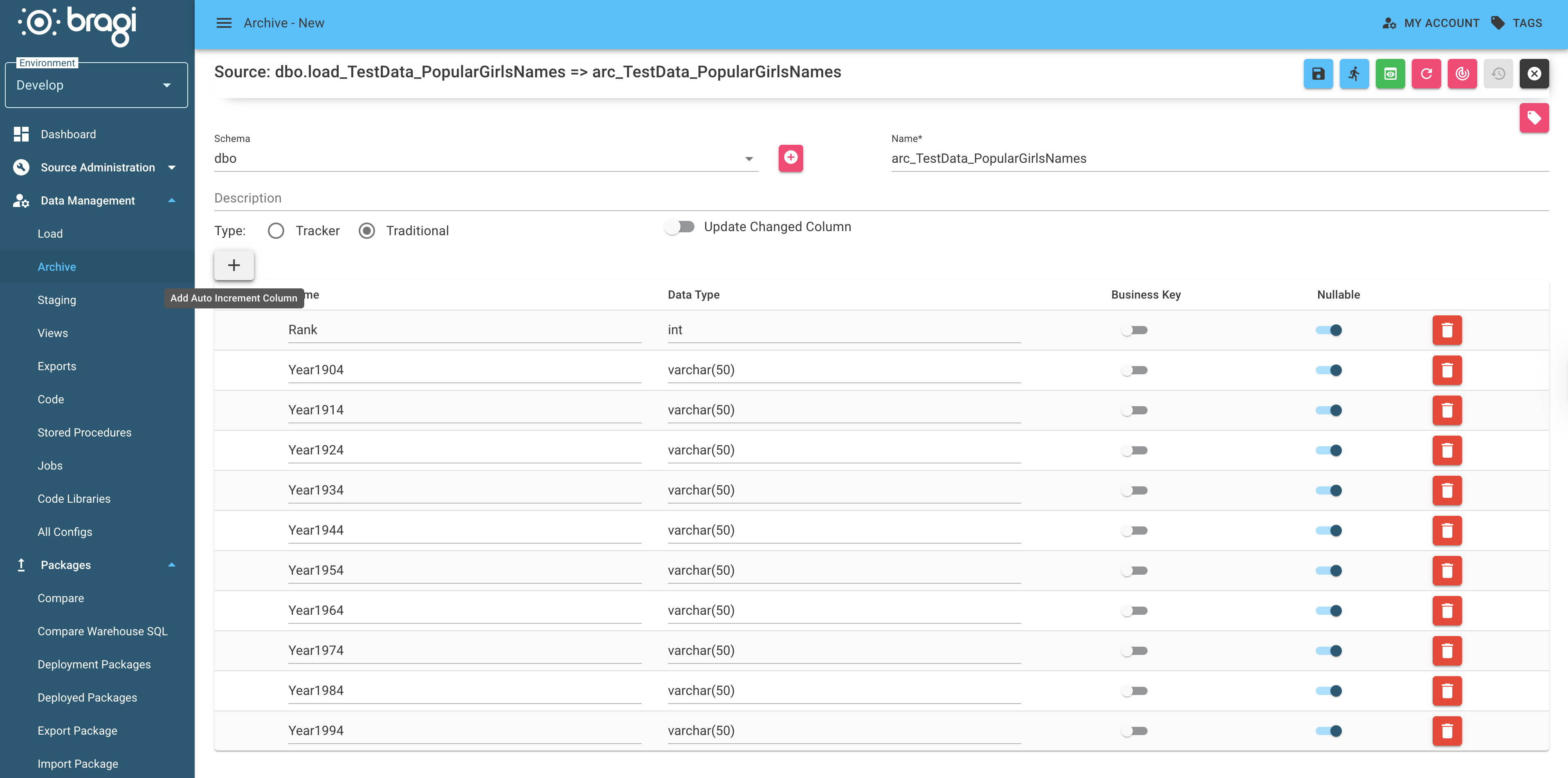
Traditional Archives add the following columns beyond source data:
Column | Description |
|---|---|
arc_arrival_date | When the record first arrived in the archive. |
arc_update_time | The most recent update timestamp. |
Traditional Archive Example
Source dataset:
Id | Name | Address |
|---|---|---|
1 | Marc | Marcs House |
2 | Matt | Matts House |
Initial archive:
Id | Name | Address | arc_arrival_date | arc_update_time |
|---|---|---|---|---|
1 | Marc | Marcs House | 2024-01-01 | 2024-01-01 09:00:00 |
2 | Matt | Matts House | 2024-01-01 | 2024-01-01 09:00:00 |
Next day source update:
Id | Name | Address |
|---|---|---|
1 | Marc | Marcs New House |
2 | Matt | Matts House |
3 | Jase | Jasons House |
Archive after rerun (without "Update Changed Column" enabled):
Id | Name | Address | arc_arrival_date | arc_update_time |
|---|---|---|---|---|
1 | Marc | Marcs House | 2024-01-01 | 2024-01-01 09:00:00 |
2 | Matt | Matts House | 2024-01-01 | 2024-01-01 09:00:00 |
3 | Jase | Jasons House | 2024-01-02 | 2024-01-02 09:00:00 |
If Update Changed Columns is enabled, the archive updates as follows:
Id | Name | Address | arc_arrival_date | arc_update_time |
|---|---|---|---|---|
1 | Marc | Marcs New House | 2024-01-01 | 2024-01-02 09:00:00 |
2 | Matt | Matts House | 2024-01-01 | 2024-01-01 09:00:00 |
3 | Jase | Jasons House | 2024-01-02 | 2024-01-02 09:00:00 |