4. Archive Data
Archives in Bragi let you retain a long-term history and track changes to your incoming data, whether transactional or static. Once created, Archives are never wiped, providing reliable auditability and recovery across all data types.
Archive Helpers
Bragi enhances Archives with supporting objects in your data warehouse, especially Tracker Archives. These components make querying historical changes straightforward:
getChanges_<ArchiveName>Stored Procedure (Tracker only):
Returns what changed between any two points in time.getPointInTime_<ArchiveName>Stored Procedure (Tracker only):
Shows the full contents of your Archive as of a chosen timestamp.update_<ArchiveName>Stored Procedure:
Main logic for Archive maintenance, typically run via Bragi orchestration.<ArchiveName>LatestView (Tracker only):
Exposes the latest version of each record, representing the current state.
Step 1: Pick the Data to Archive
Select which Load, Stage, View, Export, or Code config you want to archive and verify your source.
Step 2: Set Archive Options
Field | Description |
|---|---|
Schema | The warehouse schema for the Archive. Use the '+' to create one. |
Name | What your Archive will be called in the warehouse. |
Step 3: Choose Tracker or Traditional Archive
There are two Archive types:
Tracker Archive
A Tracker Archive records every change with full history per business key. Each update or change results in a new versioned record.
Tracker Archive Options:
Field | Description |
|---|---|
Update Non-Changed Tracked Columns | Updates non-‘Track Changes’ columns in place, without creating new versions. |
Inc. Expiry Logic | Detects departed records and sets |
Intra-Day | Allows multiple Archive runs per day. Be aware this can rapidly grow table size. |
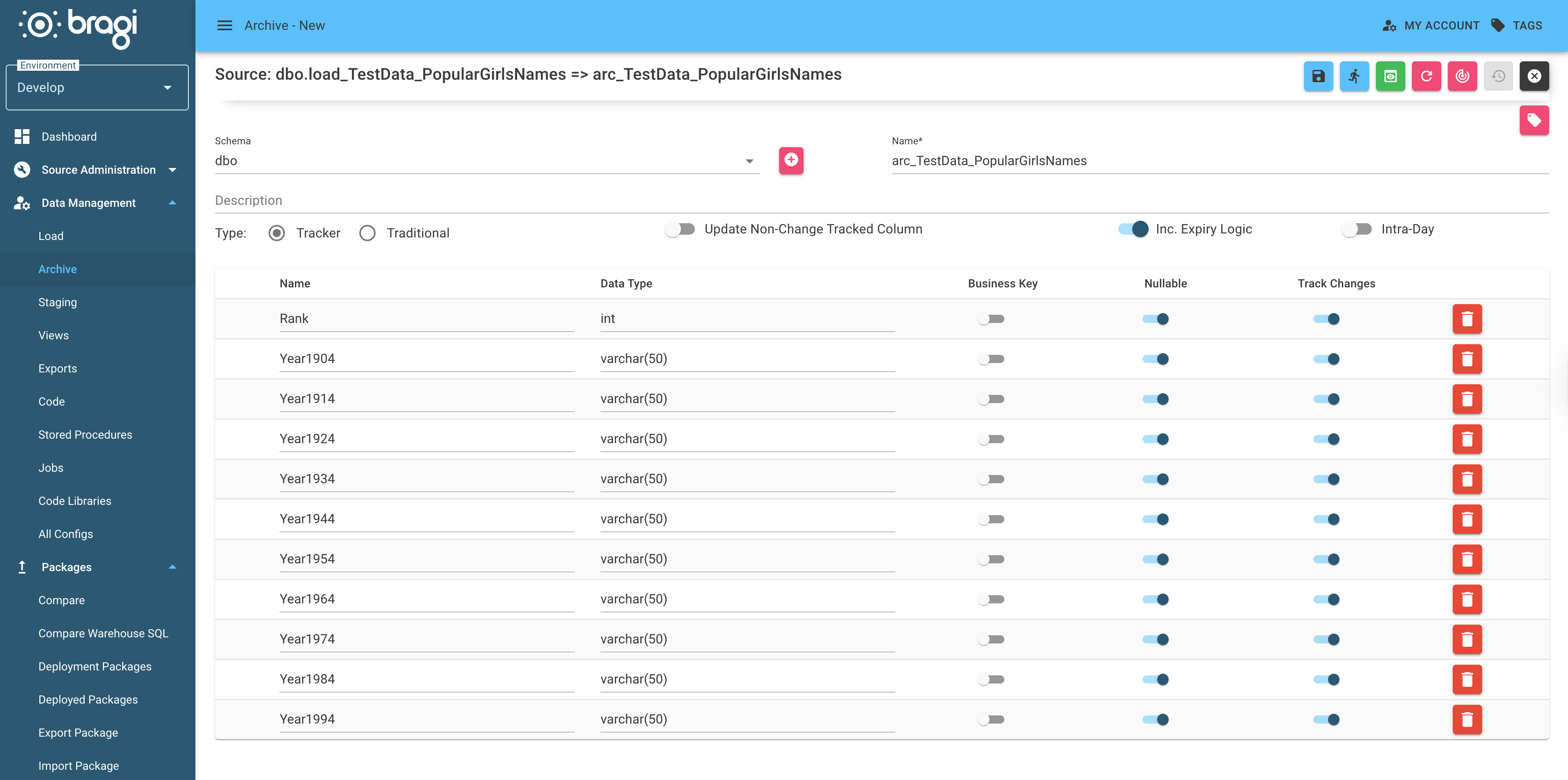
Tracker Archive Columns:
Column | Description |
|---|---|
| When the record arrived |
| When this record version departed |
| When this record version started |
| When this record version ended |
| 'Y' if the row is current/latest, 'N' otherwise |
| Version number (increments per change) |
| Timestamp of the most recent update |
Tracker Example:
Sample Source Data:
Id | Name | Address |
|---|---|---|
1 | Marc | Marcs House |
2 | Matt | Matts House |
Initial Archive State:
Id | Name | Address | arc_arrival_date | arc_start_date | arc_end_date | arc_current_flag | arc_version | arc_update_time |
|---|---|---|---|---|---|---|---|---|
1 | Marc | Marcs House | 2024-01-01 | 2024-01-01 | 2999-12-31 | Y | 1 | 2024-01-01 09:00:00 |
2 | Matt | Matts House | 2024-01-01 | 2024-01-01 | 2999-12-31 | Y | 1 | 2024-01-01 09:00:00 |
If Marc’s address is updated:
Id | Name | Address | arc_arrival_date | arc_start_date | arc_end_date | arc_current_flag | arc_version | arc_update_time |
|---|---|---|---|---|---|---|---|---|
1 | Marc | Marcs House | 2024-01-01 | 2024-01-01 | 2024-01-02 | N | 1 | 2024-01-02 09:00:00 |
1 | Marc | Marcs New House | 2024-01-01 | 2024-01-02 | 2999-12-31 | Y | 2 | 2024-01-02 09:00:00 |
2 | Matt | Matts House | 2024-01-01 | 2024-01-01 | 2999-12-31 | Y | 1 | 2024-01-01 09:00:00 |
If a new record arrives (Jase):
Id | Name | Address | arc_arrival_date | arc_start_date | arc_end_date | arc_current_flag | arc_version | arc_update_time |
|---|---|---|---|---|---|---|---|---|
3 | Jase | Jasons House | 2024-01-03 | 2024-01-03 | 2999-12-31 | Y | 1 | 2024-01-03 09:00:00 |
Traditional Archive
A Traditional Archive is a simpler archive, which maintains only one row per business key, updating existing records but not tracking history beyond the most recent value.
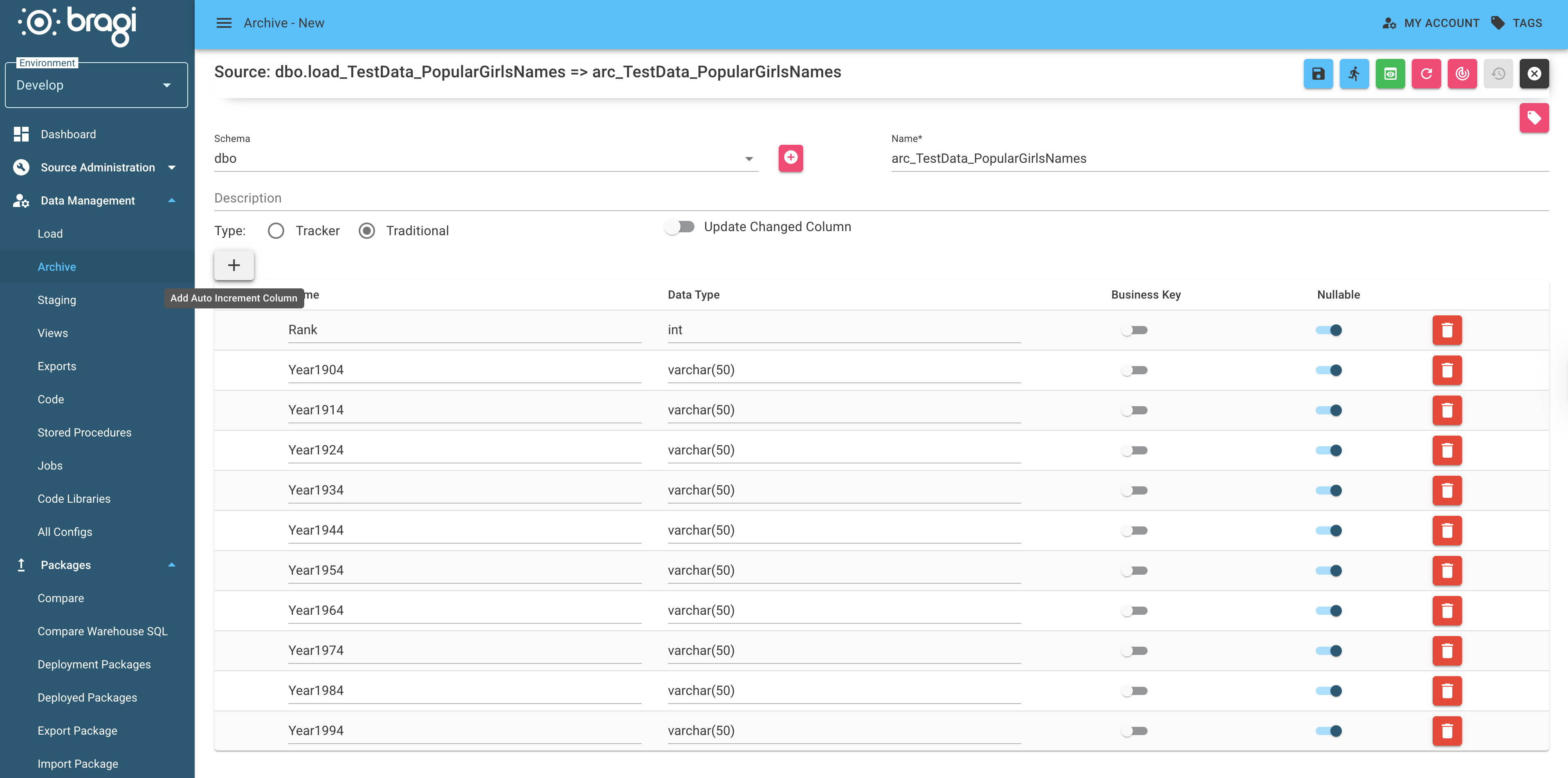
Traditional Archive Columns:
Column | Description |
|---|---|
| When the record was first seen |
| When the record was last updated |
Traditional Example:
Sample Source Data:
Id | Name | Address |
|---|---|---|
1 | Marc | Marcs House |
2 | Matt | Matts House |
Initial Archive State:
Id | Name | Address | arc_arrival_date | arc_update_time |
|---|---|---|---|---|
1 | Marc | Marcs House | 2024-01-01 | 2024-01-01 09:00:00 |
2 | Matt | Matts House | 2024-01-01 | 2024-01-01 09:00:00 |
After source change, new record added:
Id | Name | Address | arc_arrival_date | arc_update_time |
|---|---|---|---|---|
1 | Marc | Marcs House | 2024-01-01 | 2024-01-01 09:00:00 |
2 | Matt | Matts House | 2024-01-01 | 2024-01-01 09:00:00 |
3 | Jase | Jasons House | 2024-01-02 | 2024-01-02 09:00:00 |
If 'Update Changed Columns' is enabled:
Id | Name | Address | arc_arrival_date | arc_update_time |
|---|---|---|---|---|
1 | Marc | Marcs New House | 2024-01-01 | 2024-01-02 09:00:00 |
2 | Matt | Matts House | 2024-01-01 | 2024-01-01 09:00:00 |
3 | Jase | Jasons House | 2024-01-02 | 2024-01-02 09:00:00 |